![NovisLogo-White Logo-REGISTERED.svg]](https://support.novis.com.au/hubfs/NovisLogo-White%20Logo-REGISTERED.svg)
Manage your personal Never Log list
You can add email addresses and domains to your own personal never log list in your email preferences:
- In your HubSpot account, click the settings icon in the top navigation bar.

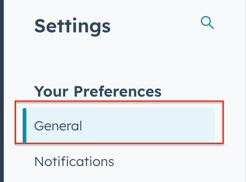
- In the left sidebar menu, navigate to General.
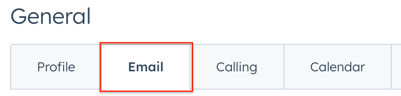
- Click the Email tab.
- In the Never Log section, click Add emails or domains.
- In the dialog box, enter one or more email addresses or domains:
- To never log emails sent to a specific recipient, enter the email address as emailaddress@domain.com (e.g., name@hubspot.com).
- To never log emails sent to any recipients with a specific domain, enter the domain as *@domain.com (e.g., *@hubspot.com).

- Click Save.
- To remove an email address or domain from the Never Log list, hover over it and click Remove.
Please note: individual users can only add up to 500 email addresses/domains to their personal Never Log list.